PDF to Image Converter user manual
General
PDF To Image Converter is an
application program based on Windows platform, which can directly convert PDF
files to dozens of image formats, such as TIF, TIFF, JPG, GIF, PNG, BMP, EMF,
PCX, TGA and so on, it does support whole PDF file to image file conversion,
include text, line, arc, ellipse, Bezier, color, image, form and other type
elements.
Function and face
-
Support dozens of image formats, include TIF, TIFF, JPG,
GIF, PNG, BMP, WMF, EMF, PCX, TGA, etc;
-
Convert PDF to Vector format (WMF and EMF);
-
Convert PDF to searchable WMF and EMF files;
-
Convert PDF to ClassF TIFF file (204x98DPI
and 204x196DPI Fax compatible TIFF
formats);
-
PDF files can be
added into file list and converted fast;
-
Support Password Protected PDF file conversion;
-
Specify any resolution in the generated Image files;
-
Standalone software, Adobe Acrobat and Reader NOT required!
-
Support batch conversion;
-
Support produce multipage TIFF files;
-
Intelligent processing of large files;
-
Support conversion into 1, 4, 8, 8-bit grayscale or
24-bit format;
-
Support for PACKBITS, CCITT Fax4/Fax3, LZW, RunLength,
JPEG, JBIG2, JPEG2000, FlateDecode etc.
compression of PDF files;
-
Can be launched from command line, from batch file or
another application;
-
Support all version of PDF formats;
- Convert PDF files to Fax compatible TIFF
files;
- Support PDF preview, so you can preview a
PDF file easily;
- Extract a page range from an existing PDF to
image files;
- Support all languages, include French, Danish, Dutch, English, German,
Italian, Japanese, Korean, Norwegian, Portuguese, Russian, Spanish, Swedish,
Chinese Simplified, Chinese Traditional etc;
- Create high-quality image formats;
- Support for Unicode and all PDF font formats;
- Options to control target compression algorithm and quality;
- Convert owner password protected PDF files to image files directly.
Getting started
VeryPDF PDF To Image Converter program is very easy to use.
Registration Window:
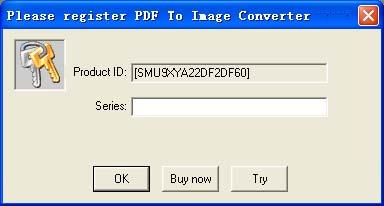
The demo version of PDF To Image Converter is
can only convert first one page from PDF file, if you wish convert more pages,
you need purchase the full license of PDF To Image Converter software. After you are convinced that the program fits your needs, you are strongly encouraged to purchase and register your copy of the software by acquiring a personal unlock key.
In your evaluate period, you may click "Try" button to try this software
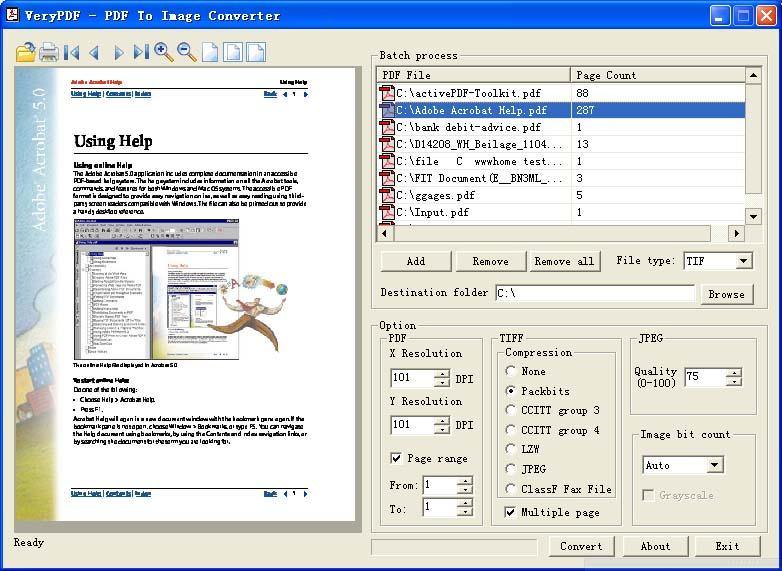
Main interface of the software:
Command Line Usage:
C:\>pdf2img.exe
-------------------------------------------------------
PDF To Image Converter Copyright © 2000 - 2013 verypdf.com Inc
Description:
Convert PDF to TIF, TIFF, JPG, GIF, PNG, BMP, WMF, EMF, PCX, TGA, etc. formats
Release Date: July 26 2012
Usage: pdf2img [options] <-i PDF File> [-o Output]
-i [input PDF file] : Specify input PDF filename
-o [output TIF file] : Specify output TIFF filename
-g
: Convert to 8-bit grayscale image file, this option
is only available while bitcount equal 8 (-b 8)
-m
: Set output to multi-page TIFF file, the
default is output to single page TIFF files
-r [resolution] : Set resolution in generated
image files
-r 300
: Set horizontal and vertical resolution to 300 DPI
-r 200x300 : Set
horizontal and vertical resolution to 200x300 DPI
-r 204x98 : Set
horizontal and vertical resolution to 204x98 DPI
-f [first Page] : First page to convert
-l [last Page] : Last page to convert
-c [compress] : Set compression method
in generated image
files (for tif only)
-c none
: Create TIFF file without compression
-c lzw
: Compress TIFF using LZW arithmetic
-c jpeg
: Compress TIFF using JPEG arithmetic
-c packbits : Compress TIFF
using packbits arithmetic
-c g3
: Compress TIFF using CCITT G3 arithmetic
-c g4
: Compress TIFF using CCITT G4 arithmetic
-c ClassF :
Compress TIFF into Fax compatible ClassF 204x98 format
-c ClassF196 : Compress TIFF into Fax
compatible ClassF 204x196 format
-q [quality] : Set quality in
generated image files (for jpeg image only)
-b [bit count] : Set bit count in generated
image files
-?
: Help
-------------------------------------------------------
Example:
pdf2img -i C:\input.pdf -o C:\output.tif
pdf2img -m -i C:\input.pdf -o C:\output.tif
pdf2img -c lzw -i C:\input.pdf -o C:\output.tif
pdf2img -q 80 -i C:\input.pdf -o C:\output.jpg
pdf2img -b 4 -i C:\input.pdf -o C:\output.tif
pdf2img -i C:\input.pdf -o C:\output.tif -b 1 -c ClassF -r 204x98 -m
pdf2img -f 1 -l 9 C:\input.pdf -o C:\output.jpg
pdf2img -i C:\*.pdf -o C:\*.pcx
Please notice, if your input pdf's filename or output tiff's filename contain
space(s), you must use quotation mark to include them, for example,
C:\>pdf2img "C:\123 456.pdf" "C:\my test\aaa.tif"
How to buy PDF To Image Converter?
PDF to Image Converter order page:
/app/pdf-to-image-converter/try-and-buy.html
Requirements to system
Windows98/ME/NT/2000/XP/2003 OS.
64M or more memory.
100MHZ CPU
 VeryPDF Cloud OCR API
Web to PDF Converter Cloud API
HTML to Image Converter Cloud API
Free Online PDF Toolbox
VeryPDF Cloud OCR API
Web to PDF Converter Cloud API
HTML to Image Converter Cloud API
Free Online PDF Toolbox  Free Online Advanced PDF Converter
Free Online PDF Compressor
Free Online PDF Splitter
Free Online DOCX to DOC Converter
Free Online Word to PDF Editor
Free Online ShareFile
Free Online RSS Feed to Email
Free Online Advanced PDF Converter
Free Online PDF Compressor
Free Online PDF Splitter
Free Online DOCX to DOC Converter
Free Online Word to PDF Editor
Free Online ShareFile
Free Online RSS Feed to Email
 Knowledge Base
 Submit a Ticket
 Send an Email
 Custom Solutions
 Support Options
 Contact Us